
The customer clicks on a beer. They expect a picture, a description, a price, and perhaps a rating to help justify buying something that costs far too much for a bottle of beer.
They expect one page.
In the previous post, we put the information for that page into three different services. Catalog owns the name, description, image, and stock information. Finance owns the price and discount. Marketing owns the rating and popularity information.
That separation made sense when we were discussing who gets to decide what. Now we have to build a website, and the browser would quite reasonably like to know where its product is.
This is where I want to start the technical part of the OmNomNom series. We will follow one request for one beer, from the page that needs it to the services that contribute the information. Along the way, we will see how those boundaries become working code.
A page needs more than one owner knows
Imagine the product page with a different color around each service’s contribution:
| Part of the page | Service that owns it |
|---|---|
| Beer name, image, brewery, description, and available stock | Catalog |
| Price and discount | Finance |
| Rating and number of ratings | Marketing |
The page brings these things together because they help the customer make a choice. That does not give Catalog authority over prices, or Finance a reason to start storing beer descriptions.
We could make the browser request each part separately. We could write a controller that retrieves the catalog data, looks up the price, fetches the rating, and assembles everything. Or we could move that work into an API gateway, sometimes built specifically for the frontend and called a BFF, a backend for frontend.
All of those approaches can produce the page. But somewhere, we have introduced code that knows exactly where every piece of information comes from. It knows to ask Catalog for the name, Finance for the price, and Marketing for the rating. Moving that knowledge from the browser to a gateway still leaves us with a component that understands all three services.
That is the knowledge we have been trying to keep out of other boundaries. Each service should know everything it needs about its own information and behavior, and as little as possible about the others. Finance knows how to supply a price. Catalog should not need to know how to ask Finance for one. A central gateway should not need that knowledge either.
For OmNomNom, each service owns the code that contributes its information to the page. The browser makes one request, and those contributions come together in a composition gateway. The gateway itself knows nothing about beers, prices, or ratings. It provides a place for the services’ code to run.
That is ViewModel composition.
A service boundary includes the UI
Catalog owns the product information, the composition code that retrieves it, and the UI components that display it. Finance owns the same pieces for pricing. Marketing owns them for ratings and popularity.
That gives each service a boundary running all the way from its storage schema to its part of the user interface:
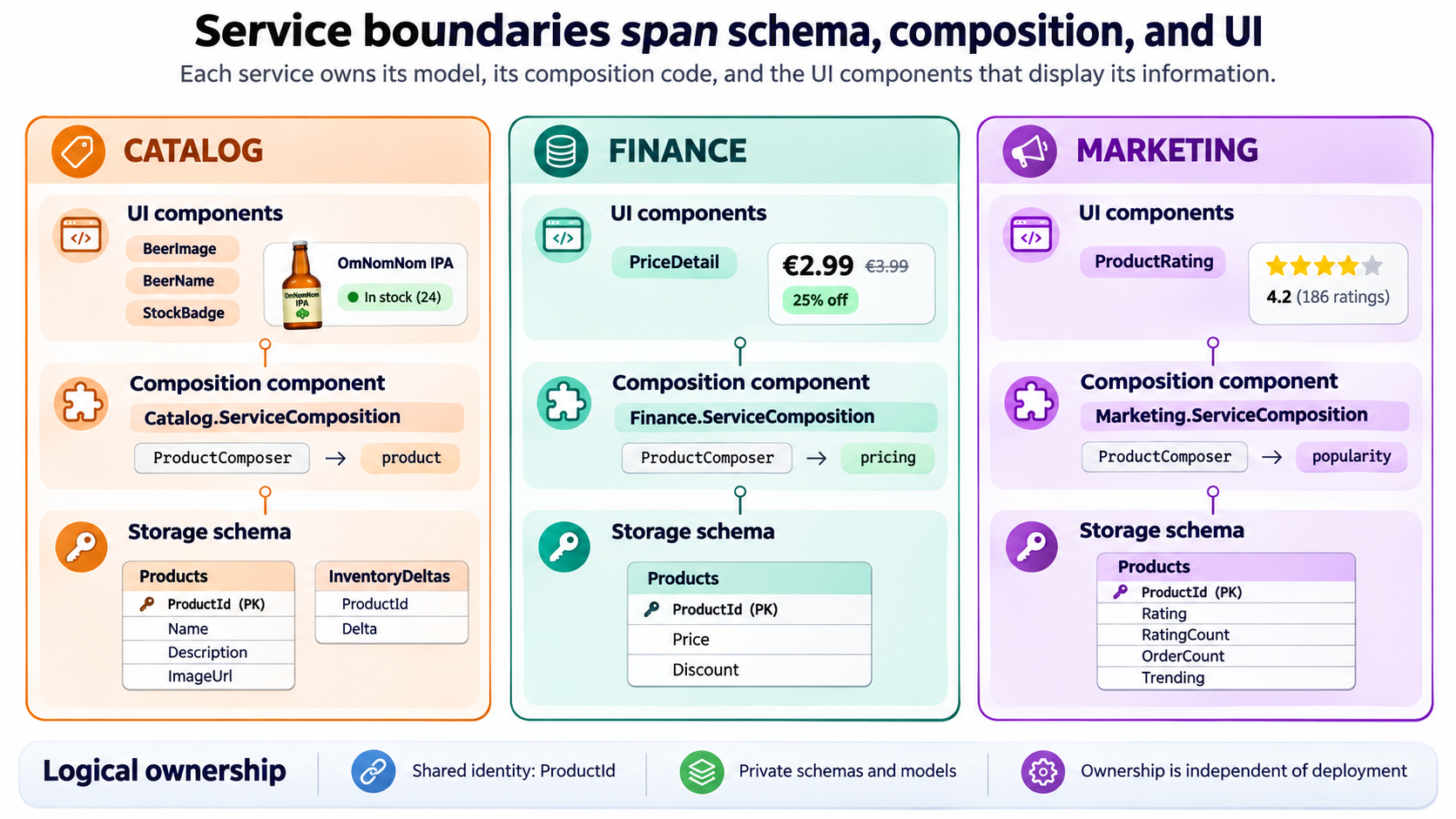
The schema cards show selected tables and fields owned by each service. This view describes ownership without choosing database instances or processes. Putting UI components in the same logical boundary as their composition code does not mean they execute in the same place.
A gateway that knows nothing
OmNomNom’s CompositionGateway is an ASP.NET Core application using the ServiceComposer NuGet package. There is no product controller in that application with a list of services to call.
Instead, during deployment, each service supplies a .NET assembly containing its composition code. Catalog supplies Catalog.ServiceComposition, Finance supplies Finance.ServiceComposition, and Marketing supplies Marketing.ServiceComposition. In this demo, project references bring those assemblies into the gateway application.
ServiceComposer discovers the composition handlers in the supplied assemblies and uses their route declarations to determine which code to run when a URL is requested. Each service declares how its code participates. The gateway does not contain a handwritten map saying which service supplies which field.
Deployment brings components from different services into the same host. The three composition assemblies run inside the CompositionGateway process. Their UI components run in the browser as parts of the same page. In this demo, each service’s storage schema is deployed in its own SQLite database file.
The colors below follow the service ownership from the first diagram, while the outer boxes show where the pieces run and how their data reaches the page:
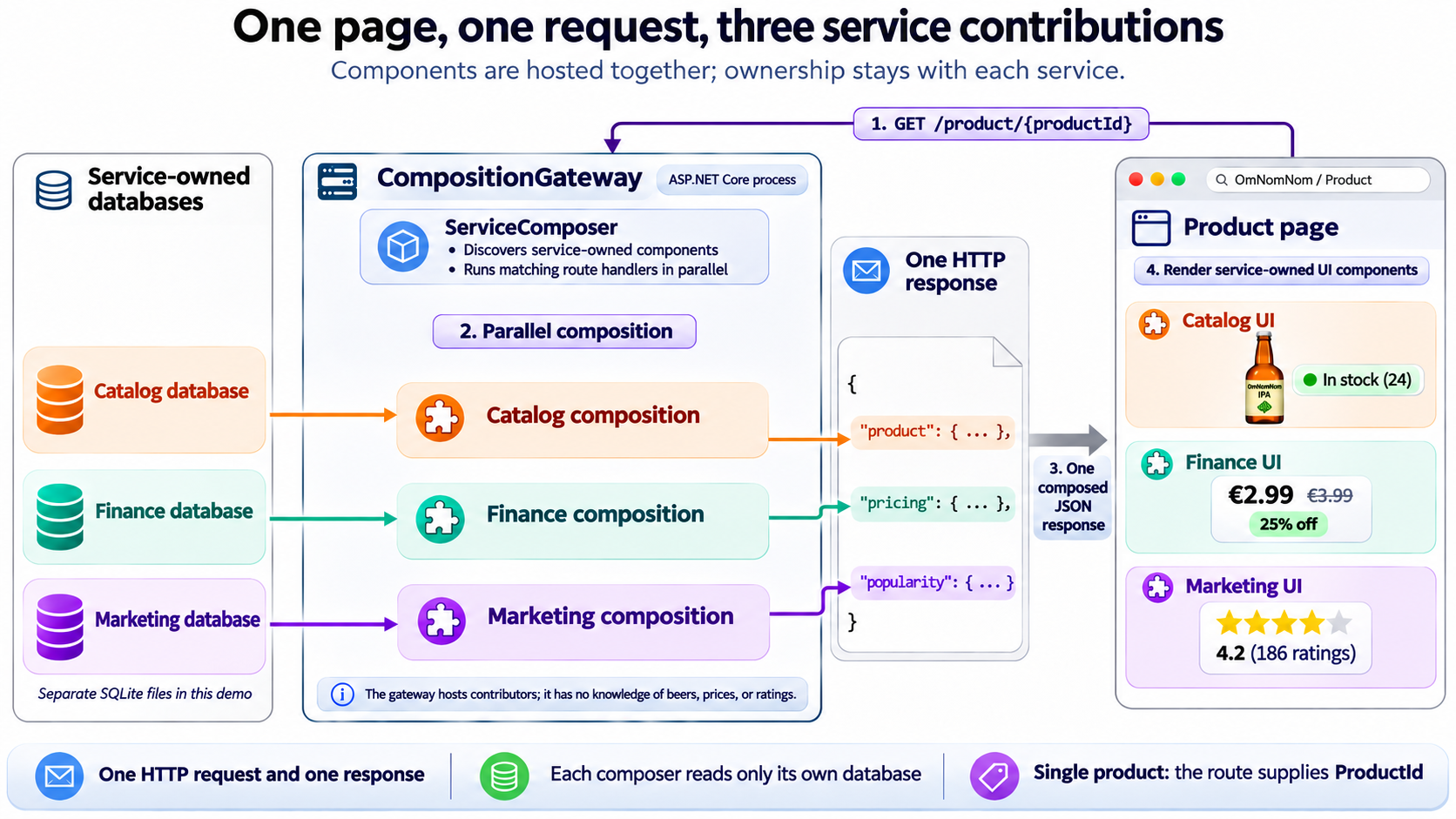
The numbered steps start with one product request from the browser. ServiceComposer runs the matching handlers in parallel, and each handler queries its own database. The colored arrows trace those contributions into one composed JSON response. The page then passes each section to the components that display it.
This is an important detail. There are no HTTP calls from the gateway to three backend APIs in this example. The gateway hosts code belonging to three services. Catalog’s component can read Catalog’s database, Finance’s can read Finance’s database, and Marketing’s can read Marketing’s database.
Hosting them together does not mean Catalog gets to read Finance’s tables. The separation follows the service that owns the code and data, even though its composition code runs alongside other services’ composition code.
We will get to the NServiceBus endpoints when we start processing orders. Reading this product page does not send any NServiceBus messages.
ServiceComposer was created by my friend Mauro Servienti. He also created ViewModelComposition.com, and the code lives in the ServiceComposer GitHub organization. If you want to explore the topic further, his extensive ViewModel Composition series covers the ideas and implementation in much more detail.
Following one product request
When the customer opens a product page, the website requests /product/{productId} from the gateway, through the website’s /api proxy. The identifier tells all three contributors which beer we are talking about.
All three services already have what they need to begin: the product identifier in the URL. Catalog can retrieve the beer’s description and stock, Finance can retrieve its price, and Marketing can retrieve its rating. None needs to wait for another service to load its data first.
Each service declares a composition handler for the same route. ServiceComposer runs the matching handlers in parallel and waits for them to complete before returning the response.
Each handler writes its own section of that response. Catalog supplies product, Finance supplies pricing, and Marketing supplies popularity. There is no shared product object that one service has to create before the others can contribute.
The gateway does not decide which of these services goes first. There is no first service. It hosts the matching handlers, and each supplies the information it owns.
Now we have enough context to open the code.
Catalog contributes the product
Catalog’s contribution comes from its ProductComposer. Its composition handler attribute and HTTP route are how Catalog tells ServiceComposer that it has code to run for this URL. That declaration lives in Catalog’s assembly:
[CompositionHandler]
public class ProductComposer(CatalogDbContext dbContext, IHttpContextAccessor http)
{
    [HttpGet("/product/{productId}")]
    public async Task Handle(Guid productId)
    {
        var request = http.HttpContext!.Request;
        var vm = request.GetComposedResponseModel();
        var ct = request.HttpContext.RequestAborted;
The route supplies the product identifier. GetComposedResponseModel() gives the handler the response object for this request. Catalog puts its product information in the response’s Product property.
The next part of the handler queries CatalogDbContext for the product and available stock. Those are both Catalog’s information. There is no join to a price table in Finance’s database and no rating column to retrieve from Marketing.
Catalog then maps its data into the object that will represent the product on this page:
    public static dynamic MapToViewModel(Product product, int inStock)
    {
        dynamic vm = new ExpandoObject();
        vm.ProductId = product.ProductId;
        vm.Name = product.Name;
        vm.Description = product.Description;
        vm.ImageUrl = product.ImageUrl;
        vm.BeerStyle = product.BeerStyle;
        vm.Brewery = product.Brewery;
        vm.Country = product.Country;
        vm.InStock = inStock;
        return vm;
    }
}
ExpandoObject lets Catalog build its part of the ViewModel dynamically. This object contains Catalog’s fields. Pricing and popularity have their own sections in the response.
The database entity stays inside Catalog. The object being created here is Catalog’s ViewModel for display. Catalog assigns it to the response:
vm.Product = Mapper.MapToViewModel(row.Product, row.InStock);Finance and Marketing each work on a different property of that same response model. They do not modify Catalog’s product object.
Finance supplies the price
Finance has its own ProductComposer. It declares the same HTTP route as Catalog and receives the same identifier from the URL. It retrieves its product and contributes a pricing section:
[CompositionHandler]
public class ProductComposer(FinanceDbContext dbContext, IHttpContextAccessor http)
{
    // The product id comes from the route, so there is no need to wait
    // for Catalog. This runs side by side with the other boundaries'
    // composers and writes only Finance's own slice of the response.
    [HttpGet("/product/{productId}")]
    public async Task Handle(Guid productId)
    {
        var request = http.HttpContext!.Request;
        var vm = request.GetComposedResponseModel();
        var ct = request.HttpContext.RequestAborted;

        var product = await dbContext.Products
            .SingleAsync(s => s.ProductId == productId, ct);

        vm.Pricing = new
        {
            product.Price,
            product.Discount
        };
    }
}
The constructor takes FinanceDbContext. That detail is more significant than the class name. Although this code runs in the gateway, it reads Finance’s model from Finance’s database.
Finance’s product has the pricing fields it needs. It does not need Catalog’s description to retrieve a price, and it does not inspect Catalog’s ViewModel. The shared identifier is enough.
The matching route declaration is what connects Finance to this request. Catalog does not invoke it, and Finance does not inspect Catalog’s contribution. Both can perform their database queries at the same time. The gateway needs no code that names Finance or asks it for a price.
Marketing also declares a handler for /product/{productId}. It uses MarketingDbContext to find its product and supplies a popularity section:
vm.Popularity = new
{
    product.Rating,
    product.RatingCount,
    product.OrderCount,
    product.Trending
};
Once all three handlers have completed, the response contains their three contributions. The order in which the database queries finish does not matter: each handler writes to its own section.
One response for the browser
The gateway serializes the composed response with camel-case property names. A shortened example, with illustrative values, looks like this:
{
  "product": {
    "productId": "20f42e76-54a2-45d4-8f83-6518c833421b",
    "name": "An unnecessarily expensive stout",
    "inStock": 12
  },
  "pricing": {
    "price": 9.50,
    "discount": 0
  },
  "popularity": {
    "rating": 4.2,
    "ratingCount": 318
  }
}
The page receives this response through gateway.getProduct(productId). It can pass the relevant fields to the components that render them. Here is a small part of the actual product page:
<ProductRating rating={popularity?.rating} ratingCount={popularity?.ratingCount} />
<PriceDetail price={pricing?.price} discount={pricing?.discount} />
<ProductDescription description={product.description} />
<StockBadge inStock={product.inStock} />
The customer sees a rating, a price, a description, and a stock indicator together. They do not need to know how many services contributed to the page. We will look more closely at the frontend components later in the series. For now, notice that the price component receives Finance’s pricing fields and the rating component receives Marketing’s popularity fields.
What we brought together
At this point, it would be reasonable to ask whether we just recreated the shared Product model we spent the previous posts trying to avoid.
We did create a response containing information from several services, with a separate section for each contribution. The important question is what that object is allowed to do.
It describes what the page should display. It does not decide prices, update stock, or determine which beers are trending. Those decisions still belong to their respective services. Nothing writes this combined object back as a shared database entity.
There is still a contract to maintain. Finance’s frontend component expects the pricing fields its backend component supplies. The contributors agree on the URL and which response properties they supply. Using dynamic also means misspelled properties can become runtime problems rather than compiler errors.
And this particular implementation expects all three services to have data for the requested product. Finance and Marketing use SingleAsync; a missing record fails the request. An optional contribution would need an explicit choice about what the page should show when that information is unavailable.
Those are real implementation trade-offs. Composition does not remove the need to agree on how a page is assembled. It gives each service a place to contribute without putting every service’s data access and presentation rules into one central controller.
For a similar page in your own application, start by identifying who owns each piece of information. Give each owner responsibility for retrieving and presenting its contribution. Then keep the code that hosts the request focused on bringing those contributions together.
The boundaries from the previous post can now serve a customer. Catalog supplies the beer, Finance supplies the price, and Marketing supplies the rating. The result is one product page.
What changes when we need a list?
For this page, the product identifier is already in the request. That is what makes the three contributions independent.
The homepage has a different problem. Catalog selects a page of products, taking filters and paging into account. Finance and Marketing need to know which products were selected before they can retrieve the prices and ratings for that page.
OmNomNom uses a composition event to make those selected products available to the other contributors. That introduces a dependency we did not need for the single-product page. It is still composition inside the HTTP request, with each service retrieving its own data.
We follow that list request in Composing product lists with ServiceComposer. It gives us a concrete reason to introduce composition events: one contribution needs context that another contribution produces.