
Keycloak is in place. The realm exists, the audience mapper is attached, the public servicepulse client is configured, the test user has a non-temporary password. Part 2 ended with a token from the Account Console that has the right iss, aud, and scope on it. Time for the other half of the conversation. ServiceControl needs to be told where to validate that token, what audience to expect, and what to hand the browser so ServicePulse can run the login dance on its own.
This is the post where everything connects. By the end, the browser hits https://sc.<yourdomain>, gets redirected to Keycloak, logs in, and lands in ServicePulse with a JWT attached to every API call.
What ServiceControl needs to know
Three things distinguish one identity provider from another, from ServiceControl’s point of view. The authority URL says where to fetch the public keys and metadata. The audience value says which aud claim to accept. The client ID and scopes say what to put into the redirect URL when sending the browser to log in. Everything else, the JWT validation flags, the HTTPS metadata requirement, the forwarded-headers configuration, doesn’t change when you swap providers. Move from Keycloak to Duende IdentityServer, or to Auth0, or to Microsoft Entra, and only those four values change. That’s the framing worth keeping in mind as the next few env vars roll past.
The block looks like this in docker-compose.yml:
# The vars that change when you swap identity providers. Everything
# else in this block is generic OIDC validation policy.
SERVICECONTROL_AUTHENTICATION_ENABLED: "true"
SERVICECONTROL_AUTHENTICATION_AUTHORITY: ${OIDC_AUTHORITY}
SERVICECONTROL_AUTHENTICATION_AUDIENCE: ${OIDC_AUDIENCE}
SERVICECONTROL_AUTHENTICATION_SERVICEPULSE_CLIENTID: ${OIDC_SERVICEPULSE_CLIENTID}
SERVICECONTROL_AUTHENTICATION_SERVICEPULSE_AUTHORITY: ${OIDC_AUTHORITY}
# Single-quoted so YAML doesn't parse the JSON array as a sequence;
# the literal string lands in the container's env intact.
SERVICECONTROL_AUTHENTICATION_SERVICEPULSE_APISCOPES: '${OIDC_SERVICEPULSE_APISCOPES}'
SERVICECONTROL_AUTHENTICATION_VALIDATEISSUER: "true"
SERVICECONTROL_AUTHENTICATION_VALIDATEAUDIENCE: "true"
SERVICECONTROL_AUTHENTICATION_VALIDATELIFETIME: "true"
SERVICECONTROL_AUTHENTICATION_VALIDATESIGNINGKEY: "true"
SERVICECONTROL_AUTHENTICATION_REQUIREHTTPSMETADATA: "true"
The first group is the API side. SERVICECONTROL_AUTHENTICATION_ENABLED flips OIDC on; nothing else here matters when it’s off. AUTHORITY points at the realm’s base URL, the one whose /.well-known/openid-configuration ServiceControl fetches at startup to learn where to find Keycloak’s signing keys. AUDIENCE is the value ServiceControl compares against the aud claim on every incoming token. It has to match servicecontrol-api, the value the audience mapper from Part 2 puts in the token.
The second group is what ServiceControl hands to the browser at /api/configuration. ServicePulse, running in the browser, calls that endpoint at startup, reads the JSON, and uses it to configure its OIDC client library. SERVICEPULSE_CLIENTID is the public client created in Part 2. SERVICEPULSE_AUTHORITY is the same realm URL; it’s pasted twice because the API and the SPA each consume it independently, and conceptually they could point at different things. SERVICEPULSE_APISCOPES is a JSON-encoded array of the scopes ServicePulse requests at login (["openid","profile","email","servicecontrol-api"]). ServiceControl passes the value through to ServicePulse verbatim via /api/configuration, and the SPA calls JSON.parse on it; a space-separated string here crashes ServicePulse at load with Unexpected token … is not valid JSON. The first three are standard. The fourth, servicecontrol-api, is the scope whose audience mapper makes the resulting token valid for the API.
The third group is JWT validation policy. All five flags should be on. Issuer validation ensures the token was actually signed by the configured authority. Audience validation enforces what we just talked about. Lifetime checks the exp claim. Signing-key validation confirms the signature. HTTPS metadata requires the discovery endpoint to be served over TLS. These are listed explicitly rather than left to defaults, partly because the defaults can shift between versions, and partly because the configuration then reads as a checklist.
The audit twin
ServiceControl runs as two cooperating instances: the error instance that hosts the API and ServicePulse, and the audit instance that stores message history. Both expose HTTP endpoints. Both verify JWTs. Both need to know about Keycloak. The audit instance uses the same env vars, prefixed with SERVICECONTROL_AUDIT_ instead of SERVICECONTROL_:
SERVICECONTROL_AUDIT_AUTHENTICATION_ENABLED: "true"
SERVICECONTROL_AUDIT_AUTHENTICATION_AUTHORITY: ${OIDC_AUTHORITY}
SERVICECONTROL_AUDIT_AUTHENTICATION_AUDIENCE: ${OIDC_AUDIENCE}
SERVICECONTROL_AUDIT_AUTHENTICATION_VALIDATEISSUER: "true"
SERVICECONTROL_AUDIT_AUTHENTICATION_VALIDATEAUDIENCE: "true"
SERVICECONTROL_AUDIT_AUTHENTICATION_VALIDATELIFETIME: "true"
SERVICECONTROL_AUDIT_AUTHENTICATION_VALIDATESIGNINGKEY: "true"
SERVICECONTROL_AUDIT_AUTHENTICATION_REQUIREHTTPSMETADATA: "true"
SERVICECONTROL_AUDIT_FORWARDEDHEADERS_ENABLED: "true"
SERVICECONTROL_AUDIT_FORWARDEDHEADERS_TRUSTALLPROXIES: "true"
The audit instance has no SPA of its own (ServicePulse talks to it through the error instance), so there’s no SERVICEPULSE_* block to mirror. Everything else lines up one-to-one. If the two ever diverge, it’s almost always because someone updated the error instance’s env vars and forgot the audit’s. A sanity check after any change: grep the compose file for AUTHENTICATION_AUTHORITY and confirm both occurrences read the same value.
Forwarded headers
The reverse proxy in front terminates TLS and forwards plain HTTP to ServiceControl. From inside the container, the request looks like http://auth-servicecontrol:33333/..., but the browser used https://sc.<yourdomain>/.... ServiceControl needs to know the original protocol and host, because it has to build redirect URLs that send the browser back to itself, and http://auth-servicecontrol:33333 is not a URL the browser knows what to do with.
SERVICECONTROL_FORWARDEDHEADERS_ENABLED: "true"
SERVICECONTROL_FORWARDEDHEADERS_TRUSTALLPROXIES: "true"
FORWARDEDHEADERS_ENABLED makes ServiceControl read the X-Forwarded-Proto, X-Forwarded-Host, and X-Forwarded-For headers and rewrite the request URL accordingly. TRUSTALLPROXIES says any caller adding those headers is to be trusted; in a POC with a single reverse proxy on a private network that’s fine. In production this is the place to whitelist the proxy’s IP range instead.
The audit instance has its own pair of these vars (SERVICECONTROL_AUDIT_FORWARDEDHEADERS_*) and they’re already part of the audit auth block above.
The reverse proxy
Two proxy hosts need to exist: one for Keycloak, one for ServiceControl. The screenshots are from Nginx Proxy Manager because that’s what I run, but any reverse proxy that terminates TLS and forwards the standard X-Forwarded-* headers does the job equally well. Traefik, Caddy, plain nginx, the Cloudflare tunnel, all fine. The configuration values are the same; only the UI differs.
For Keycloak:
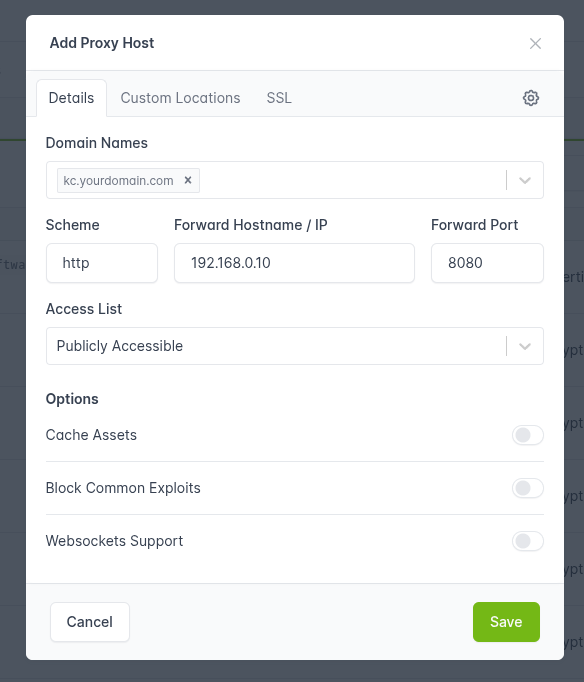
The forward host is the Docker host’s LAN IP, the same <host-ip> from Part 1’s DNS table. The compose file publishes Keycloak’s port 8080 on the host, so any proxy on the LAN can forward to it without needing to share a docker network. The scheme is HTTP. Force SSL and HTTP/2 Support are on, because we want every external request to be HTTPS and modern; Block Common Exploits is on as a cheap baseline. No advanced configuration is needed for Keycloak; KC_PROXY_HEADERS=xforwarded from Part 2 takes care of trusting what the proxy adds.
For ServiceControl:
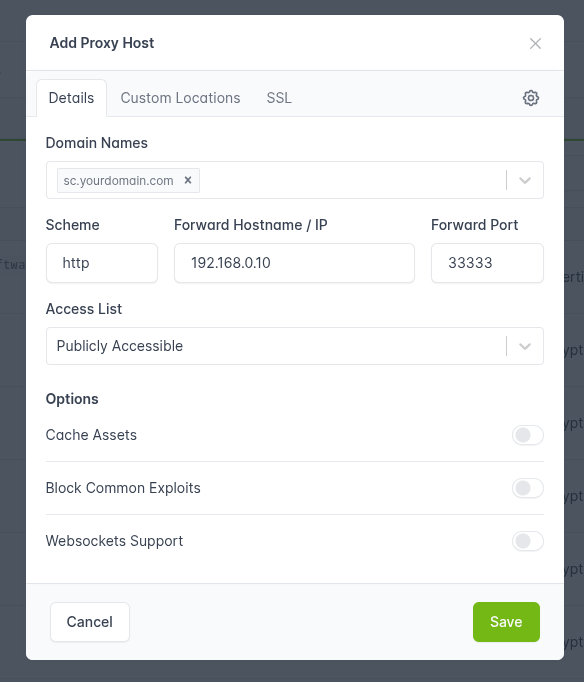
Same shape, different port. Forward host the same <host-ip>, port 33333. The same flags. ServiceControl picks up the forwarded headers via the env vars from earlier in this post.
If the proxy is something other than NPM, the equivalent configuration in nginx looks like:
location / {
    proxy_pass         http://<host-ip>:33333;
    proxy_set_header   Host              $host;
    proxy_set_header   X-Forwarded-Proto $scheme;
    proxy_set_header   X-Forwarded-Host  $host;
    proxy_set_header   X-Forwarded-For   $proxy_add_x_forwarded_for;
}
In Traefik, the labels on the ServiceControl container do the equivalent automatically once the entrypoint and certificate resolver are set up.
Bring everything up
With Keycloak already running, start the rest of the stack:
docker compose up -d auth-ravendb auth-servicecontrol auth-servicecontrol-audit
docker compose logs -f auth-servicecontrol
Both ServiceControl services are started with command: --setup-and-run. On the very first boot that’s what creates the RabbitMQ queues and exchanges and the RavenDB databases the instance needs; on every later boot the setup pass is a no-op against what already exists. Skipping it leaves the queues unprovisioned and ServiceControl fails at startup with Cannot validate the delivery limit of the 'Particular.ServiceControl' queue because it does not exist.
ServiceControl’s startup logs the discovery URL it fetches. The line to look for is Connected to RavenDB followed by something along the lines of Authentication: validating tokens against https://kc.<yourdomain>/realms/particular. If the discovery fetch fails, ServiceControl refuses to start, and that’s the right behaviour, the alternative is silently accepting unsigned tokens.
The login flow
Open https://sc.<yourdomain> in a browser. ServicePulse loads, immediately calls /api/configuration, reads back the OIDC settings, and redirects the browser to Keycloak:

The URL in the address bar is worth a look. It contains the client_id (servicepulse), the redirect_uri (the SP origin), the scope (openid profile email servicecontrol-api), the response_type (code), and a code_challenge with code_challenge_method=S256. That challenge is PKCE in action. The browser generated a verifier, hashed it, and Keycloak now has the hash. When the browser comes back with the authorization code, it has to present the original verifier to redeem it.
Log in with the test user. Keycloak issues a code, redirects the browser to https://sc.<yourdomain>/?code=.... ServicePulse exchanges the code for an access token (presenting the PKCE verifier), and lands you in the dashboard:
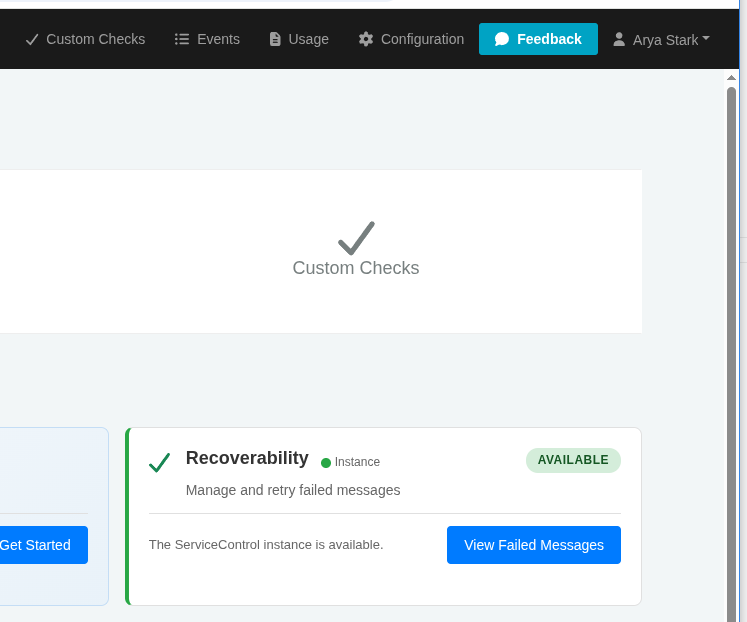
From here on, every API call ServicePulse makes to ServiceControl carries an Authorization: Bearer <token> header. ServiceControl validates the token on every request: signature, issuer, audience, lifetime. Anything that fails goes back as 401. Anyone who isn’t logged in doesn’t get past the dashboard’s first XHR.
That’s the flow. Keycloak is the gatekeeper, ServiceControl trusts what it signs, and the integrated ServicePulse drives the dance from the browser without ever holding a long-lived secret.
In Part 4 we’ll cover what every error message means when this doesn’t work, and the list of things that a setup like this is deliberately not yet ready to do in production.